Background
Who is this app for?
This app is for players of the sport of croquet looking for a convenient, digital way to track deadness, score, and time in accordance to the official rules of the game.
When will it be available?
The app passed Apple App Store review today, and is currently available. The Google Play version is still in review, and we expect it to become available later this week. Check out the Software page for download links and more details.
How did we come to release this app?
About ten years ago, we released Croquet Pro - an arcade-inspired 9-wicket croquet video game for iPhone and Android. At the time, our knowledge of croquet was limited to the colorful balls, mallets, and thin wire wicket sets that many families play in their backyard with simplified rules that more or less amount to just running through the course.
Croquet Pro was not our first game, but it was a huge step forward in ambition - our first big release since getting our feet wet in the “industry” working on proper mobile games from big publishers. The app quickly became one of our most popular, and it wasn’t long before a friendly person reached out to us with the suggestion that we build a new game inspired by the “real” association-style rules. Intrigued, we pored over the rule books and released Croquet Pro 2 in 2017.
A few years after that, in 2020, another person asked if we could bring the Deadness Board - used in Croquet Pro 2 to track the ball’s alive or dead state - to its own app so enjoyers of the real sport of croquet could track their games on the fly with their mobile device, instead of needing a physical board which may not be handy, or require a helper to manage for them.
We were overjoyed at the proposition and quickly moved to release the app and incorporate further feedback. Since the release of Deadness Board Pro, we have been delighted to receive feedback from more croquet players and we have collected this feedback to release the next iteration of our project - Deadness Board Advanced.
What happens to the old Deadness Board Pro app?
As mentioned in our last post, we decided to release this as a new app because of our personal pet peeve on apps not keeping legacy versions available upon a UI overhaul. In case anyone is partial to the old version, we are keeping it available in the store. However, since it runs on older code, it may be removed eventually by the app stores or not run on newer phones/operating systems.
What’s New
The main additions to the app come from feedback from users of our original Deadness Board app.
Apple Watch support
The first and most exciting upgrade is the companion Apple Watch app (also works with WearOS for Android users.)
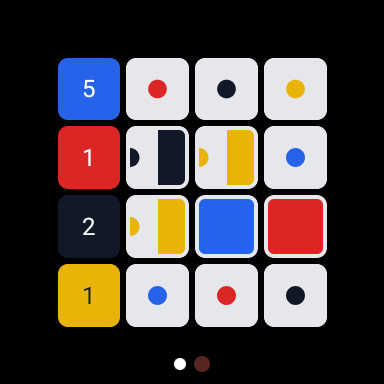
The watch app can be used independently or in sync with the phone app, and allows convenient tracking of the deadness state without needing to have a free hand for a phone.
Multi-player sharing
For the first time, the deadness board can be shared between multiple users of the app. The sharing works cross-platform.
In order to cover server costs, we have put this feature behind a subscription. Only the host of the board needs a subscription - guests can join for free, and a free trial is available to see if the feature is right for you.
Technical improvements
The app runs on more modern and native code for both Android and Apple devices, helping ensure that the app can be maintained and kept available for download in the future.
How the app works
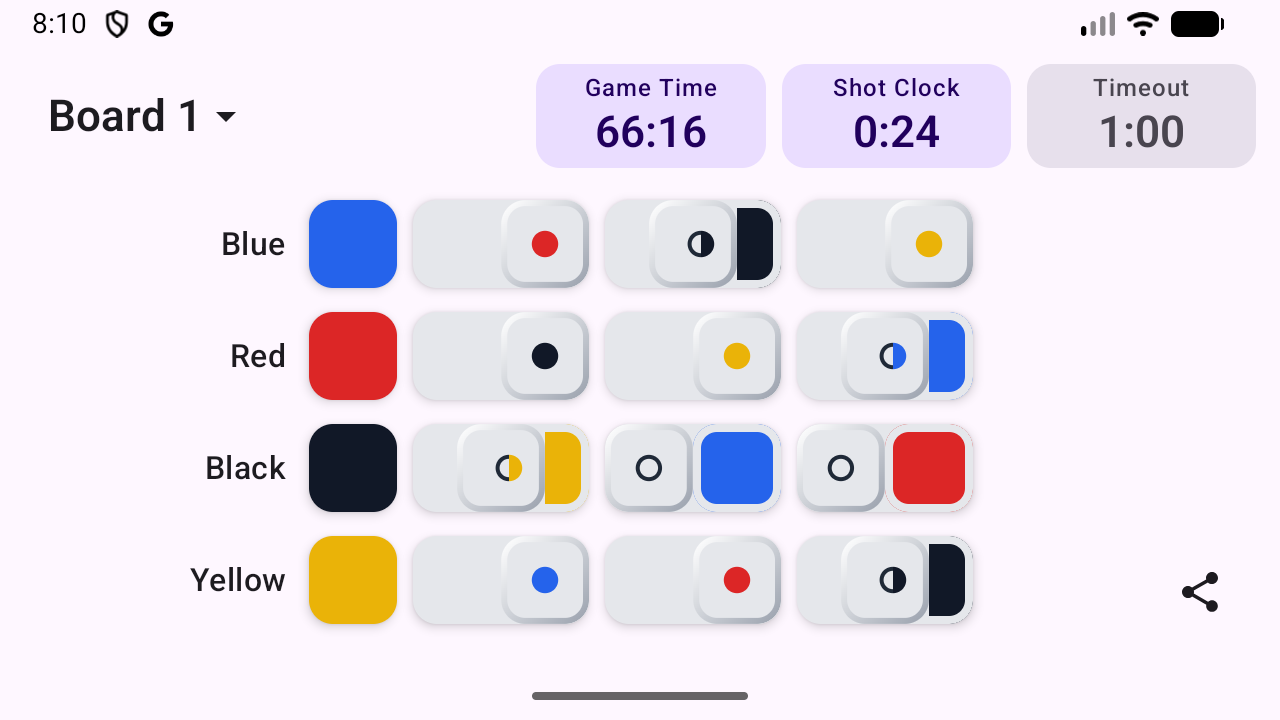
- The deadness board displays in the same familiar layout as a physical board would.
- Tapping the square on the board transitions that status from alive to dead, and vice-versa. There is also a halfway position.
- There is an optional score tracker that can be incremented by tapping the first square with the ball’s color. Tapping the square resets all deadness for that ball. A long press resets the score to 0.
- Timers are available for overall game time, a shot clock, and time-outs. Tapping the timer stops or starts it, and long-pressing the timer resets the time to its original value.
- Timer lengths, player nicknames, and other options are available by tapping the Board’s name, bringing up the Settings Menu.
- The companion Watch app syncs automatically. It can also be run independently.
- The sharing menu is accessed by selecting the sharing icon and following the on-screen prompts.
- Supports both portrait and an extended landscape view.
Closing Thoughts
We hope that you will enjoy our latest app and support our development efforts. As always, we welcome any feedback, criticism, bug reports, or any way that we can improve the app for the better.